
Checkout: USD

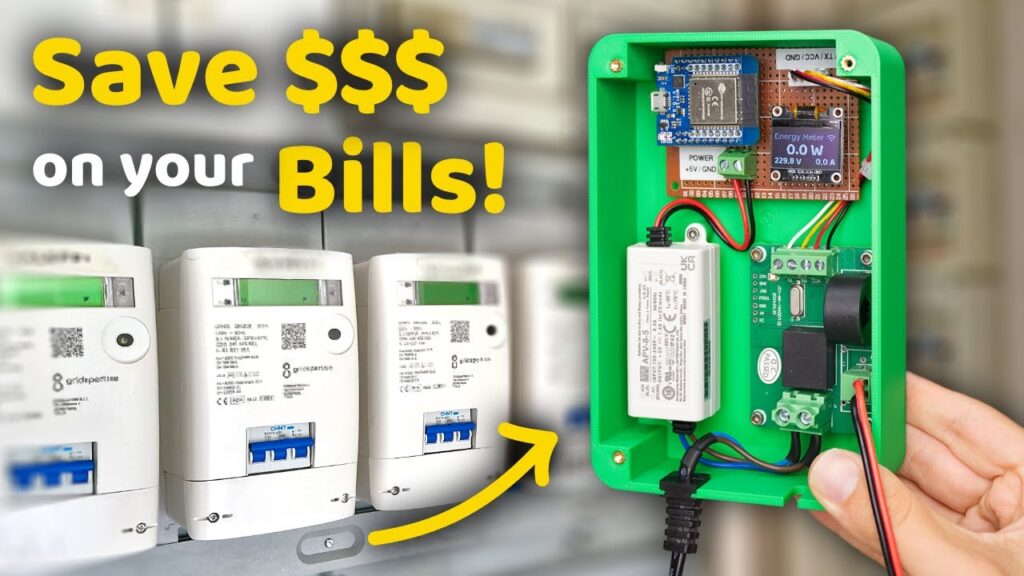
Build Your Own ESP32 Smart Energy Meter: Slash Bills with Real-Time Monitoring

Picture watching your electricity bill drop 15% as you detect vampire loads, balance phases, and schedule high-wattage devices off-peak—all using a $25 DIY monitor. With ESP32’s processing power and IoT capabilities, transform raw current data into actionable savings.

Why Track Energy? The Shocking Truth

Residential buildings waste 20-30% of electricity (US DoE). Commercial ESP32 solutions cost $200+, but a DIY build offers:

  • Real-time appliance profiling: Spot energy hogs like old AC units or standby devices

  • Grid independence: Monitor solar/wind input during outages

  • Utility-grade accuracy: Achieve ±1% error with proper calibration


Component Selection: Balance Cost vs. Precision

Component Key Function Critical Specs Cost
ESP32-S3 Processing & Connectivity Dual-core, 8MB PSRAM for data buffering $6
ZMPT101B AC Voltage Sensing 220V/110V input, 0-5V output $2
SCT-013-030 Non-invasive CT Clamp 30A max, 1V/A output $8
PZEM-004T v3 All-in-one Meter (Alt.) UART interface, built-in calc $12
0.96″ OLED Local Display I2C interface, 128×64 pixels $4

Safety First: Always use 3D-printed enclosures rated for mains voltage. Never expose bare PCBs!


Wiring & Signal Conditioning: Industrial-Grade Accuracy

Circuit Design Essentials:

markdown
AC Line (L) → [ZMPT101B] → ESP32 GPIO34 (ADC1)  
CT Clamp → [22Ω Burden Resistor] → ESP32 GPIO35 (ADC1)  
ESP32 GPIO21/22 → OLED SDA/SCL

Critical Calibration Steps:

  1. Phase Compensation:

    cpp
    // Adjust for CT clamp phase shift (typically 1.7° @ 50Hz)
    float phaseShift = 0.0297; // radians
    realPower = Vrms * Irms * cos(φ - phaseShift);
  2. Voltage Calibration:

    • Measure wall voltage with multimeter → Scale ZMPT101B output

  3. CT Linearization:

    • Test with known loads (100W bulb, 1500W heater)


Firmware: From Raw ADC to kWh Insights

1. Core Libraries

cpp
#include <EmonLib.h>   // Energy calculations
#include <Adafruit_GFX.h> 
#include <Adafruit_SSD1306.h> // OLED
#include <WiFi.h>
#include <PubSubClient.h> // MQTT

2. Real Power Calculation

cpp
void loop() {
  sampleV = analogRead(VOLT_PIN) * 0.0008; // Convert ADC to volts (3.3V ref)
  sampleI = analogRead(CURRENT_PIN) * 0.0008; 
  
  // Apply calibration factors
  Vrms = sampleV * 216.7; // For 220V systems
  Irms = sampleI * 30.0;  // SCT-013-030 scaling
  
  realPower = Vrms * Irms * powerFactor;
  energy += realPower * (sampleInterval / 3600000.0); // kWh
}

3. Data Transmission

cpp
void publishData() {
  client.publish("home/energy/power", String(realPower).c_str());
  client.publish("home/energy/kwh", String(energy, 3).c_str());
}

Cloud Integration: Turn Data Into Action

Platform Strengths Visualization Example
Home Assistant Local control, no cloud fees Real-time power flow diagrams
ThingsBoard Advanced analytics, anomaly det. Cost projection charts
Google Sheets Simple CSV logging Appliance usage pie charts

Case Study: Berlin maker reduced bills 18% by:

  1. Identifying 24/7 80W server drain

  2. Shifting laundry to off-peak hours

  3. Adding automation: “IF solar > 3kW THEN enable EV charging”


Advanced Techniques for Utility-Grade Performance

  1. Harmonic Filtering

    cpp
    // Apply 50/60Hz bandpass filter
    float filteredI = filter50Hz(rawI, sampleRate);
  2. Voltage Sag Detection

    • Trigger UPS switch-on when voltage < 200V (220V systems)

  3. Predictive Maintenance

    • Flag motor degradation when current harmonics increase >15%


Safety & Certification Considerations

  • Isolation: Use double-insulated CT clamps (SCT-013)

  • Enclosure: IP54 rating minimum for garage/outdoor use

  • Legal Note: “This meter provides guidance only. Utility billing requires certified equipment.”


Real-World Applications Beyond Homes

  1. Solar Farm Monitoring

    • Track input vs. grid export profits

  2. EV Charging Stations

    • Enforce max current limits per socket

  3. Industrial Machine Health

    • Detect bearing failures from motor current signatures


Troubleshooting Common Issues

  • Noisy Readings?

    • Add 0.1µF capacitors between ADC pins and GND

    • Separate CT wires from mains cables

  • WiFi Disconnects?

    • Use WiFi.setSleep(false) to prevent RF interference

  • ADC Overflow?

    • Attach 100kΩ resistors as voltage dividers


Knowledge is Power – Literally
While utilities charge more each year, your ESP32 meter becomes the ultimate financial advisor: revealing hidden costs, enabling smart automation, and paying for itself in months.

“You can’t manage what you don’t measure. Now you measure everything.”

Start saving today: Which appliance will you audit first? Share your build journey below!


Resources & Credits

Disclaimer: Working with mains voltage requires expertise. Consult an electrician for permanent installations.


======================================

About ESP32S.com

Since 2016, ESP32S.com has grown to become a complete ecosystem partner for your IoT journey. Based in Shenzhen, a global hub for electronics innovation, we have helped hundreds of developers and businesses bring their ESP32-based ideas to life. Our team is dedicated to providing exceptional support and innovative solutions to help you achieve your IoT goals.
At ESP32S.com, we master the intricacies of developing an ESP32-based product, which involves multiple stages, from concept to market launch. That’s why we now offer comprehensive solutions covering the entire product lifecycle for ESP32-based devices. Whether you need help with PCB design, prototyping, production, or even marketing and fulfillment, we have you covered.

Contact Us

Ready to take your IoT project to the next level? Contact ESP32S.com today to learn more about our comprehensive solutions for ESP32-based devices. Let us be your trusted partner in bringing your innovative ideas to life. Contact us now to get started.

Table of Contents

Related Posts
Start typing to see products you are looking for.
Shopping cart
Sign in

No account yet?

Shop
Wishlist
0 items Cart
My account